 Skip to content
Quick answer
If you forget your 66 Lottery password, tap Forgot password on the login screen and follow the prompts; the login page also says “If you forget your password, please contact customer service”. Have your registered +91 number ready and use only the in-app 24/7 Customer service. Never share an OTP or your UPI PIN with anyone during recovery.
Where is the Forgot password option on 66 Lottery?
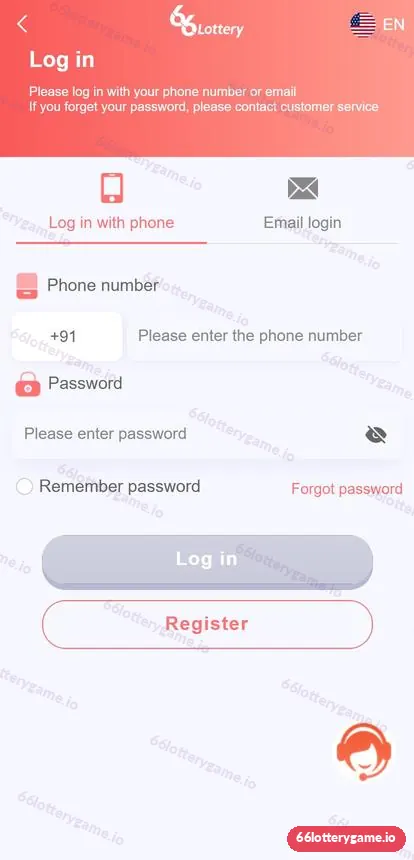
Forgot password is a small coral link on the right, directly under the password field on the login page, opposite the Remember password tick box. The page header also carries a recovery instruction: “If you forget your password, please contact customer service.” Both routes lead back to your account.
Who is this recovery guide for?
This guide is for members who are locked out because they forgot their password, changed phones, or suspect someone else changed it. It also helps players whose Remember password setting was cleared after an app update. If you still know your password but the login page will not load, the main login guide’s troubleshooting table is a quicker fix.
How do I reset my 66 Lottery password?
- Open the 66 Lottery login page and tap Forgot password under the password box.
- Enter the +91 mobile number (or email) you registered with and follow the on-screen verification.
- If the reset does not complete, tap the headset icon or open 24/7 Customer service from the menu.
- Give support your registered number and describe the problem. Do not send your old password or any OTP in chat.
- Once support or the reset flow confirms, set a new password you have never used before and log in.
What information will customer service ask for?
Support usually needs enough to match you to the account, not your secrets. Useful details include the registered phone number, the approximate date you joined, and if you have made payments, a recent deposit amount with its date. A genuine agent will never ask for your UPI PIN, card CVV or an OTP sent to your phone for a payment.
| Safe to share | Never share |
|---|---|
| Registered phone number | UPI PIN or bank PIN |
| Approximate join date | OTP codes |
| Recent deposit amount and date | Card number and CVV |
| Screenshot of the error message | Your new password |
Why can’t I reset my password?
- Wrong number: you may have registered with a different SIM. Try your other numbers.
- Email account: if you signed up by email, use the Email login tab and recover by email.
- Wrong platform: an account from another “66” app will not exist here; see 66 Club login.
- Network issues: switch between Wi-Fi and mobile data and try again.
How do I avoid forgetting my password again?
Use a password manager or a private written note kept somewhere safe, and only tick Remember password on your own phone. Avoid reusing the password from email or UPI apps. If you think someone else knows your password, change it immediately and check your Transaction history for anything unfamiliar.
Can someone else reset my password?
Only if they control your phone number or trick support, which is why your SIM and OTPs matter. Lock your phone, do not let others use your SIM, and treat any unexpected “your password was reset” message as urgent. Contact customer service from the app straight away if that happens.
66 Lottery forgot password FAQs
How do I reset my 66 Lottery password?
Tap Forgot password on the login page and follow the verification steps. If it does not work, contact the in-app 24/7 Customer service.
What does the 66 Lottery login page say about forgotten passwords?
It says “If you forget your password, please contact customer service”, so support is an official recovery route.
Will customer service ask for my OTP?
Real support should not ask for payment OTPs, your UPI PIN or card details. Share only your registered number and account details.
I changed my phone number. Can I still recover my account?
Contact customer service with your old registered number and any deposit records. Recovery depends on the platform’s checks.
Is my balance safe while I am locked out?
Your balance stays with the account. Check Transaction history after you log back in to confirm nothing changed.
Key takeaways
- Forgot password is under the password field on the login page.
- The login page officially directs forgotten-password cases to customer service.
- Share your registered number and deposit details, never PINs or OTPs.
- Set a fresh, unique password once you are back in.
Back in? Return to the 66 Lottery login guide or the 66 Lottery online hub.
