 Skip to content
Quick answer
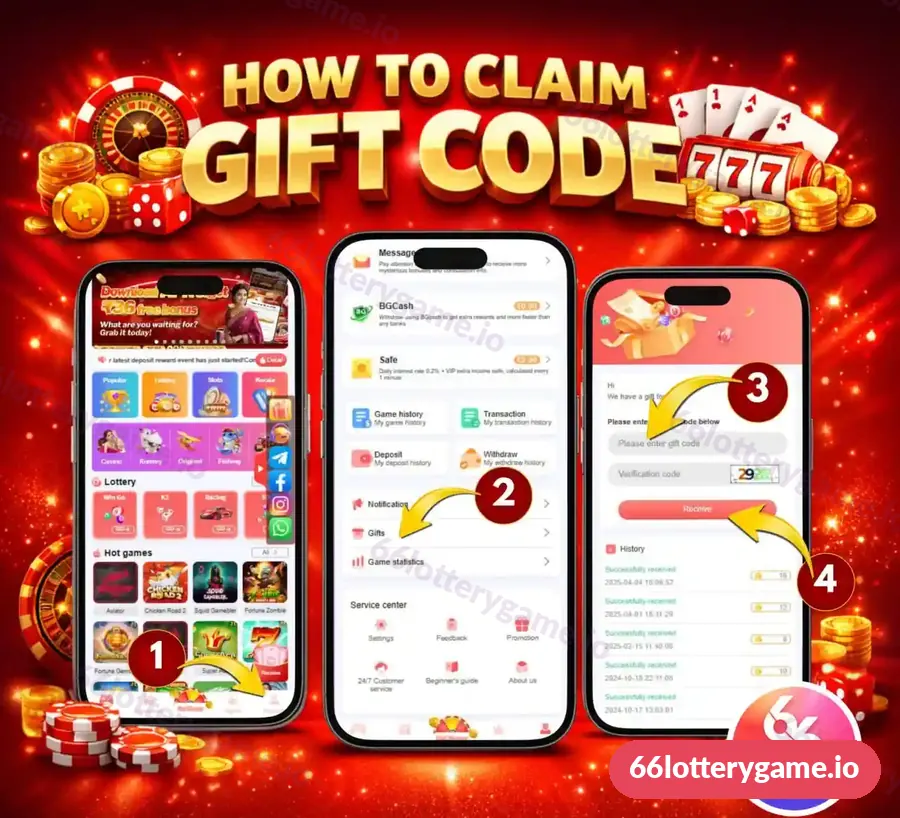
To redeem a 66 Lottery gift code: open Account, tap Gifts, enter the gift code in “Please enter gift code”, type the verification code shown, then tap Receive. Successful claims appear in the History list on the same screen. Gift codes are shared through official announcements; never pay anyone for a code.
What is a 66 Lottery gift code?
A gift code is a short redemption code that adds a reward to your account when entered on the Gifts screen. The Activity page describes Gifts as “Enter the redemption code to receive gift rewards”. Codes are usually time-limited and may have a limited number of uses.
Who can use a 66 Lottery gift code?
Any registered member can try redeeming a gift code on the Gifts screen, although individual codes can be limited to certain accounts, VIP levels or a number of claims. New members should first complete registration and log in, because the Gifts option only appears inside the Account menu. Regular players who follow official announcements are the most likely to catch codes before they expire. This guide also helps anyone who has been offered a “premium” code for money and wants to understand why genuine codes are always free.
How do I claim a gift code on 66 Lottery?
- Log in and tap Account in the bottom right of the home screen.
- Scroll to the list under Notification and tap Gifts.
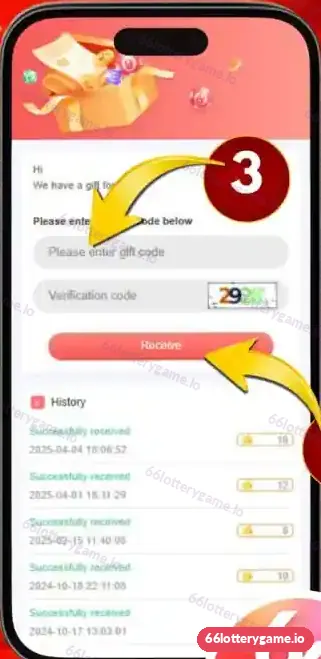
- On the gift screen (“Hi, We have a gift for you”), type the code in Please enter gift code.
- Type the characters from the Verification code image.
- Tap Receive, then check the History list for “Successfully received”.
Where can I find 66 Lottery gift codes?
Genuine codes are released through the platform’s own announcements, such as in-app notifications and the channels linked from its side bar. The app shows Telegram, Facebook, Instagram and WhatsApp icons. Many unofficial channels also post “codes”, and some are fake or expired. A real code works on the Gifts screen and never needs a payment.
| Source | Trust level | Tip |
|---|---|---|
| In-app Notification or Message | Highest | Check regularly |
| Channels linked from the app | Good | Follow the in-app icons rather than search results |
| Random Telegram groups | Low | Many reuse expired codes to grow followers |
| Paid “code sellers” | Scam | Never pay for a gift code |
Why is my 66 Lottery gift code not working?
- Expired: codes often have short validity.
- Fully used: the code may have a limited number of claims.
- Typo: check letters and numbers carefully, without spaces.
- Wrong verification code: refresh the image and retype.
- Eligibility: some codes are for specific accounts or VIP levels.
- Already claimed: check the History list.
Do gift code rewards need turnover?
They can. Gift rewards may carry wagering conditions before withdrawal, like other promotions. Check the reward’s terms or ask customer service. Our bonus guide explains turnover and claim windows.
66 Lottery gift code FAQs
How do I redeem a 66 Lottery gift code?
Open Account, tap Gifts, enter the gift code and verification code, then tap Receive.
Where is the Gifts option in 66 Lottery?
In the Account menu, below Notification and above Game statistics.
Where do I get 66 Lottery gift codes?
From official announcements, in-app notifications and channels linked from the app. Never pay for a code.
Why does my gift code say invalid?
It may be expired, fully used, mistyped or not eligible for your account.
Where can I see claimed gift codes?
In the History list on the Gifts screen, which shows each successful claim.
Key takeaways
- Redeem codes in Account, Gifts: code, verification code, Receive.
- History shows each successful claim.
- Get codes from official announcements only.
- Codes expire and may carry turnover rules.
See all rewards in the 66 Lottery bonus guide, or go back to the 66 Lottery gift code hub.
