 Skip to content
Quick answer
To deposit on 66 Lottery, log in, open Account, tap Deposit, choose a payment method, enter the amount and complete the payment in your UPI or wallet app. The home page lists Google Pay, Paytm, PhonePe and UPI under Payment Method. Every deposit appears in “My deposit history”. Never pay a personal UPI ID that someone sends you in chat.
How do I add money to 66 Lottery?
Deposits always start inside your logged-in account, from the Deposit button in the account menu, labelled “My deposit history” underneath. That button opens the deposit screen, where you pick a method and amount. The menu also shows BGCash and Safe, which are explained in our 66 Lottery wallet guide.
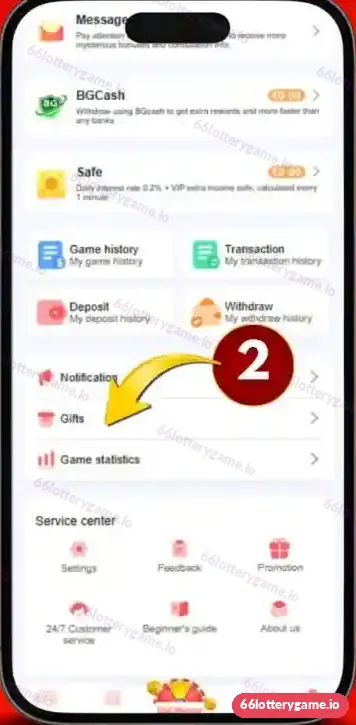
- Log in and tap Account (or Wallet) in the bottom bar.
- Tap Deposit.
- Choose a payment method shown on the screen, such as UPI.
- Enter or tap an amount, then confirm.
- Complete the payment in your UPI or wallet app and return to 66 Lottery.
- Check that the deposit shows in My deposit history and your balance.
Who is this deposit guide for?
It is for new members making their first deposit, and for regular players whose deposit is pending or who want to understand the payment options shown on the platform. It also suits anyone who has been asked to pay outside the app and wants to know why that is risky.
Which payment methods does 66 Lottery accept?
The 66 Lottery home page displays Google Pay, Paytm, PhonePe and UPI under “Payment Method”. The live deposit screen is the final word, because methods and channels can change. Some announcement channels also mention options such as USDT; only use what appears inside your own account.

| Method | How it works | Tip |
|---|---|---|
| UPI | Pay from any UPI app to the displayed details | Use the in-app payment page only |
| Google Pay | UPI payment through Google Pay | Check the amount before approving |
| Paytm | Paytm UPI or wallet | Keep the transaction ID |
| PhonePe | UPI payment through PhonePe | Screenshot the success screen |
What should I check before paying?
- The amount on the 66 Lottery screen matches the amount in your UPI app.
- You opened the payment from the Deposit button, not from a link in a chat.
- You are paying within any time limit the deposit screen shows.
- You keep the UTR or transaction reference until the deposit credits.
Why is my 66 Lottery deposit pending?
Most pending deposits are timing or reference issues, and paying again usually makes things worse.
| Situation | What to do |
|---|---|
| Money left your bank, balance not updated | Wait a short while, then check My deposit history |
| Status still pending after a reasonable wait | Contact 24/7 Customer service with the UTR and screenshot |
| Payment failed in your UPI app | No money moved; you can try again |
| Paid the wrong amount | Tell support with the UTR; do not pay again |
| Paid after the timer expired | Send support the UTR and screenshot |
Our customer care guide lists exactly what to send.
Are there deposit bonuses?
Promotions change often, so check the Promotion tab before depositing. A scrolling notice in our screenshots mentions earning 5% on every deposit when using BGcash, and the Activity page has a VIP Tier Bonus linked to deposits. Every reward carries conditions such as turnover. See our 66 Lottery bonus guide before relying on any offer.
How much should I deposit?
Only what you can afford to lose completely, and ideally a small first amount to test the full deposit-and-withdraw cycle. Decide the amount before opening the app, and never top up to chase a loss.
66 Lottery deposit FAQs
How do I deposit on 66 Lottery?
Log in, open Account, tap Deposit, choose a method, enter the amount and complete the payment in your UPI or wallet app.
Which UPI apps work with 66 Lottery?
The home page shows Google Pay, Paytm, PhonePe and UPI. Check the live deposit screen for current options.
My money left my bank but the balance did not update. What now?
Check My deposit history, wait briefly, then contact 24/7 Customer service with your UTR and screenshot.
Can I pay a UPI ID that support sends me in chat?
Use only the payment details shown on the in-app deposit screen. Be cautious with any ID sent to you directly.
Is there a minimum deposit?
The deposit screen shows the current minimum and quick-select amounts. It can change, so check there.
Where can I see my past deposits?
Under My deposit history beneath the Deposit button, and in the Transaction screen.
Key takeaways
- Deposits start from the Deposit button in your account menu.
- Google Pay, Paytm, PhonePe and UPI are listed on the home page.
- Keep the UTR until the deposit credits; never pay twice.
- Read promotion conditions before depositing for a bonus.
Ready to cash out later? Read the 66 Lottery withdrawal guide, or go back to the 66 Lottery login and wallet hub.
